Security Engineer's Guide to DevOps - Part 1: The Basics
Hey there! So here’s the thing — I recently got tasked with implementing DevSecOps and Secure SDLC at my company. Pretty exciting (and slightly terrifying) stuff, especially since I’m relatively new to the DevOps world. But hey, what better way to learn than to document the journey, right?
I figured I’d document my learning journey as I go along. This way, if you’re also diving into DevOps (maybe for similar reasons), you can learn from my experiences and mistakes — and trust me, there will definitely be some mistakes along the way! 😅
In this first part, we’ll explore fundamental DevOps concepts including:
- The continuous integration/continuous deployment (CI/CD) cycle
- Test-driven development (TDD) methodology
- Different types of testing strategies
- Modern CI platforms and tools
The Old Way vs The New Way
Remember how software used to be sold? You’d go to the store, buy a physical CD or DVD of something like RollerCoaster Tycoon, install it once, and that was it. Companies would develop software like a factory product — design it, build it, package it up in a shiny box, and ship it to stores. Once it was done, it was done (unless there were major bugs, then maybe you’d get a patch CD in the mail… yeah, that was a thing).
But here’s the thing (and this is where it gets interesting) — modern software isn’t like those old CD-ROM games at all. It’s more like a living thing that needs to grow and adapt. Think of it like a recipe that keeps getting better as people taste it and give suggestions. No more “ship it and forget it” — we’re in a world of continuous updates and improvements.
The DevOps Cycle
Here’s what the continuous improvement cycle looks like in practice:
 |
|---|
| DevOps Cycle |
| _ |
The DevOps cycle is like cooking a meal in a restaurant kitchen:
 |
|---|
| Restaurant Kitchen |
| _ |
-
Plan (Creating the Menu)
- What are we building?
- Like creating a menu and gathering recipes
- Making shopping lists and schedules
-
Code (Preparing Ingredients)
- Writing instructions that make the computer do what you want
- Like chopping vegetables and measuring spices
-
Build (Combining Ingredients)
- Putting all the pieces together into one package
- Like following recipe steps in order
-
Test (Tasting the Food)
- Making sure everything works as expected
- Like checking temperature and seasoning
-
Release (Plating the Dish)
- Preparing your software for the world
- Like adding final garnishes
-
Deploy (Serving Customers)
- Making your software available to users
- Like delivering food to tables
-
Operate (Running the Kitchen)
- Managing things in production
- Like managing kitchen operations
-
Monitor (Quality Control)
- Watching for issues before they become problems
- Like checking food quality and timing
The Three Pillars of DevOps Engineering
Let me share what I’ve learned about DevOps so far! After watching lots of beginner-friendly videos and reading tutorials, I’ve found there are three main things that need to be focused on when implementing DevOps:
1. Pull Request Automation
Think of this as your first line of defense. It’s like having a really thorough security guard check your work before you show it to everyone else. Here’s what typically gets automated:
# Example CI pipeline stages
lint_check          # Catch basic issues
run_unit_tests      # Verify functionality
security_scan       # Look for vulnerabilities
dependency_check    # Audit dependencies
notify_reviewers    # Get human eyes on the code
From what I’ve read, it’s recommended to start with basic linting and gradually add more security checks. This helps avoid getting overwhelmed by too many alerts at once.
2. Deployment Automation
This is where things get really interesting. Good deployment automation should:
- Let you test features with specific users first (canary deployments)
- Deploy without downtime (zero-downtime deployments)
- Roll back quickly if something goes wrong
- Enforce security policies consistently (this is huge for compliance!)
3. Application Performance Management
This is the unsung hero of DevOps and security monitoring. You need three things:
- Metrics: The numbers that tell you what’s happening
- Logging: The story of what your application is doing (crucial for security audits!)
- Monitoring: Turning all that data into actionable insights
Speaking of monitoring, let me tell you about my company’s monitoring setup — we’re using the ELK (Elasticsearch, Logstash, Kibana) stack and it’s been really helpful for keeping tabs on our API gateway traffic.
Here’s how the whole thing flows (I had to explain this to my rubber duck about 10 times before it finally made sense 😅):
- First, our API gateway spits out logs for every request/response (and yeah, there are A LOT of them)
- Logstash picks these up and does its magic — parsing the raw logs into something actually useful (this took some trial and error to get right)
- Then it ships everything over to Elasticsearch, which is basically this massive searchable database (seriously, you can find ANYTHING in there)
- Finally, we’ve got these sweet Kibana dashboards that turn all that data into pretty graphs and charts
Test Driven Development (TDD)
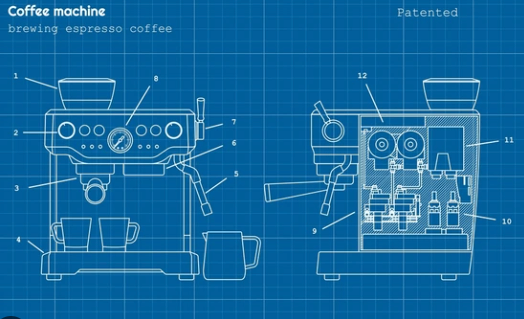
Now that we’ve covered the basics of DevOps and monitoring, let’s talk about an important practice that ties into our automation goals - Test Driven Development (TDD). When I first started learning about DevOps, I wondered why testing was such a big focus. But it makes total sense - you can’t automate deployments confidently without good tests! TDD is an approach where you write tests before creating the actual solution. Even for non-developers like me coming from a security background, this makes sense: you define what success looks like before starting the work, just like how we define security requirements before implementing controls.
 |
|---|
| Coffee Maker |
| _ |
Think of it like writing a checklist for your coffee maker before building it.
Different Types of Tests
-
Unit Tests (The Building Blocks)
def test_heater_control(): heater = CoffeeMaker().heater assert heater.can_turn_on() assert heater.can_turn_off()- Testing individual components in isolation
- Like checking if your coffee grinder works before making a full cup
-
Integration Tests (Playing Nice Together)
- Making sure components work together
- Example: Does hot water actually flow through the coffee grounds?
-
System Tests (The Full Experience)
- End-to-end testing
- Can you actually make a cup of coffee?
- This is where you find the really sneaky bugs
-
Acceptance Tests (The Customer’s View)
- Does it meet user needs?
- Most important test: Does the coffee taste good?
Continuous Integration (CI)
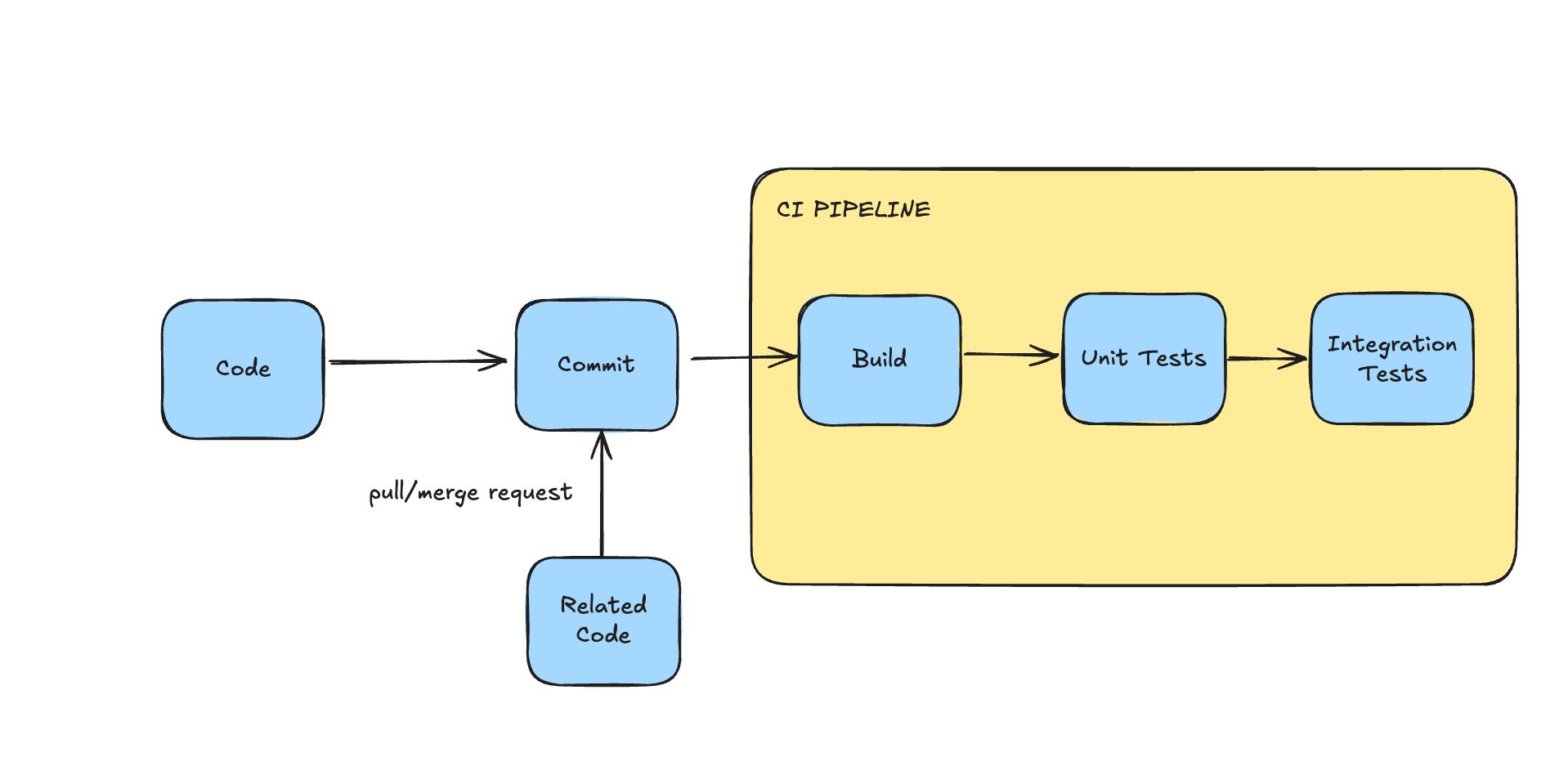
Let’s talk about one of my favorite parts of DevOps — Continuous Integration. It’s basically about pushing small changes frequently and having automated systems verify everything works.
Why CI is a Game Changer
-
Better Collaboration
- No more “works on my machine” problems
- Everyone’s changes get tested together automatically
-
Faster Development
- Quick feedback on your changes
- Catch problems early when they’re easier to fix
-
Happier Customers
- Fewer bugs make it to production
- More stable releases
Here’s what it looks like in practice:
 |
|---|
| CI Pipeline Flow |
| _ |
Real-World Example: LayerCI
I’ve been using LayerCI (currently rebranded to webapp.io) lately, and it’s pretty slick. Here’s how it works:
- LayerCI reads Layerfile config from your repo (you need to install LayerCI in your github repo first!)
here is an example of a LayerCI config from LayerCI:
FROM vm/ubuntu:18.04

# install docker-ce (from tutorial for ubuntu)
RUN apt-get update && \
    apt-get install apt-transport-https ca-certificates curl software-properties-common && \
    curl -fsSL https://download.docker.com/linux/ubuntu/gpg | apt-key add - && \
    add-apt-repository "deb [arch=amd64] https://download.docker.com/linux/ubuntu bionic stable" && \
    apt-get update && \
    apt install docker-ce

# install docker compose
RUN curl -L "https://github.com/docker/compose/releases/download/1.27.4/docker-compose-$(uname -s)-$(uname -m)" -o /usr/local/bin/docker-compose && \
    chmod +x /usr/local/bin/docker-compose

# copy the root (i.e., repository root) to /root in the runner
COPY / /root

RUN REPEATABLE docker-compose up -d --build --force-recreate --remove-orphans && sleep 6

EXPOSE WEBSITE localhost:8000
-
In webapp.io you need to define what framework you want to use in your Layerfile - it can be Docker, Docker Compose, Docker Swarm, Kubernetes, etc. LayerCI will automatically create a container, run the tests and check the results.
-
What Happens Next
- LayerCI automatically spins up an environment and runs your tests for each PR
- Smart caching means repeated builds are super fast
- Seamlessly integrates with GitHub, GitLab, and other tools you already use
[UPDATE] Recently discovered LayerCI’s RUN REPEATABLE feature — it’s like having a time machine for your test environment. Super handy for debugging flaky tests! take a look at the LayerCI docs for more info.
Real-World Examples
Let me share some DevOps Tooling scenarios I’ve learned:
Scenario 1: The Startup Life
Perfect for when you’re just starting out:
- GitHub for code (free tier works great!)
- Netlify/Vercel for deployment (seriously, these tools are magic)
- Jenkins or GitLab CI (great free CI/CD options)
- Docker (containerize all the things!)
When you’re just starting, these basic tools are enough because:
- You don’t have many users yet
- You can fix problems quickly without much impact
- You need to move fast and test ideas
Why this works: When you’re small, you need reliable tools that are easy to set up and maintain.
Scenario 2: Enterprise (Software House/B2B/SaaS)
This setup works well for software houses, SaaS and B2B companies:
- Github: Same code storage, but used more professionally
- Sentry: Like a security camera that spots problems in your running software
- PagerDuty: Wakes up the right person when something breaks
- CodeCov: Makes sure your code has good backup plans (tests)
- Bitrise/CircleCI: Automatically checks and delivers code updates
These tools are needed because:
- Business customers pay good money and expect quality
- Problems need to be caught before they affect users
- Need to know when things break immediately
Scenario 3: The Big Leagues (Social Media Scale)
When you’re handling Instagram/Facebook/Reddit level traffic:
Advanced Tool Setup:
- Github Enterprise: Like Github but with extra security and features
- Sentry: Catches errors across a huge system
- ELK Stack (ElasticSearch, LogStash, Kibana): Helps find problems in a sea of user activity
- PingDom: Constantly checks if your service is working
- Launch Darkly: Tests new features with small groups first
- Terraform: Manages all your servers and systems automatically
Custom Tooling:
- Custom Git solutions (like Facebook’s Mercurial)
- Distributed logging systems (Facebook’s Scribe, Twitter’s Zipkin)
- Custom CDNs (like Reddit’s CDN infrastructure)
- Advanced feature flag systems (Instagram’s experimentation platform)
- Custom deployment tools (like Facebook’s Buck build system)
- Massive Kubernetes clusters (Reddit runs thousands of microservices)
- Custom monitoring solutions (Facebook’s ODS, Twitter’s Observability stack)
These advanced tools are crucial because:
- Millions of users means small problems become big quickly
- Need to spot problems before users notice
- Must handle huge amounts of activity smoothly
Wrapping Up
Remember: The goal isn’t to use all these tools at once. Start small, learn what works for your team, and gradually add more sophistication as you need it. DevOps (and especially DevSecOps) is a journey, not a destination (yeah, I know it’s cliché, but it’s true!).
In my next post, I’ll show you how to get started with LayerCI - we’ll cover setting up your first pipeline, configuring basic automated tests, and some tips I’ve learned for keeping things running smoothly. I’ll also share some example configurations that you can use as a starting point. See you then!